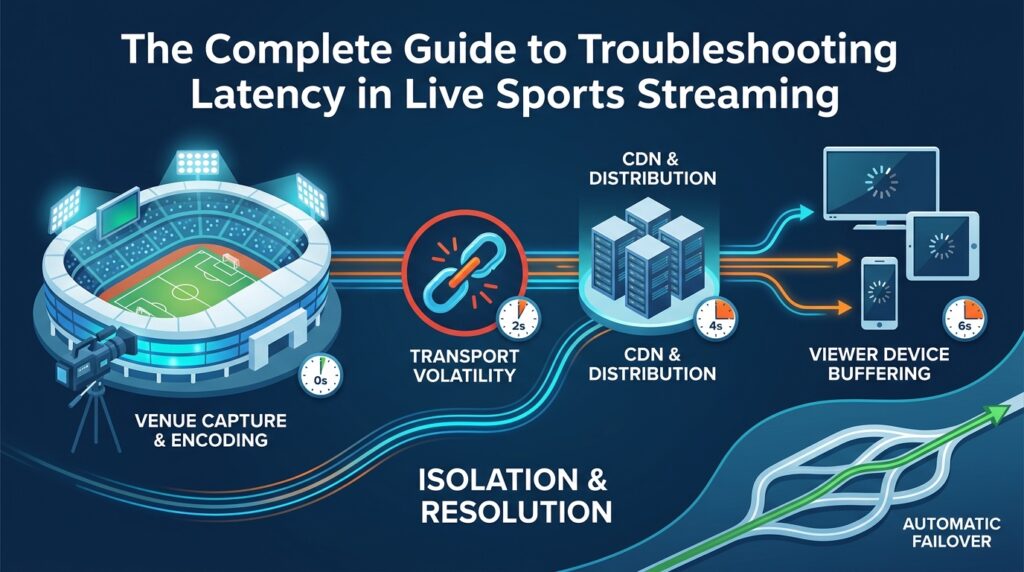
Latency in live sports streaming comes from four possible points in the delivery chain: venue capture, transport, CDN distribution, or viewer-device buffering, and the fastest way to fix it is to isolate which one is actually responsible rather than guessing at a setting. This guide breaks down where delay originates, how to isolate it during a live event, how the leading occasional-use providers compare on the capabilities that actually prevent it, and what to confirm before any broadcast goes live.
Where Latency Actually Comes From
Delay in a live sports feed isn’t a single defect; it’s cumulative, building across four distinct stages of the delivery chain.
- Venue capture and encoding: cameras and encoders add a small, largely fixed delay at the source.
- Transport to a distribution point: the feed moves via satellite, fiber, or IP-based transport, and this leg is the most exposed to real-world network conditions, particularly because sports crews frequently work from temporary venue connections rather than permanent infrastructure.
- CDN and distribution: segment size and caching behavior determine how quickly a stream reaches a viewer’s player, and a cache miss during a live viewership spike can add unexpected delay here.
- Viewer device buffering: the final stretch of delay happens on the device itself, outside a broadcaster’s direct control.
Sports latency is judged more harshly than latency in other live content, because viewers have an unavoidable real-time reference point (social media, a neighbor’s television, in-stadium noise) that makes even a small lag obvious. A documentary or scripted stream doesn’t have that problem; a live match does, every single time it airs.
It’s worth noting that each of these four stages can only add a second or two of delay on its own. The reason latency troubleshooting is genuinely difficult isn’t that any single stage is badly broken, it’s that a broadcaster who hasn’t isolated which stage is underperforming ends up applying a fix that targets the wrong layer entirely, which wastes time an event doesn’t have.
A Step-by-Step Troubleshooting Sequence
Isolating a latency issue during a live event works best as an ordered sequence rather than a scattershot check of everything at once.
- Establish the actual delay: Compare the venue feed’s own timestamp against what viewers are seeing. Viewer complaints alone arrive too late and rarely identify which stage is responsible.
- Check the transport leg: This segment sees the most instability in live sports specifically, since production teams are often working from temporary venue connections instead of fixed infrastructure.
- Check the CDN and distribution layer: Poor regional coverage or a cache miss during a live spike can introduce delay unrelated to the venue signal entirely.
- Rule out the viewer’s device: Buffering settings sit outside a broadcaster’s control but are worth confirming before assuming the fault lies upstream.
This sequence matters because it’s ordered by likelihood, not by convenience. Transport comes before CDN and distribution specifically because sports events so often rely on temporary, event-specific venue setups rather than the fixed infrastructure a broadcaster might have at a permanent studio. Skipping straight to the CDN layer because it’s easier to check remotely is a common mistake, and it tends to waste the exact minutes a live troubleshooting session doesn’t have.
Why Production Teams Get Stuck Mid-Event
Two structural gaps explain most unresolved latency issues during live sports broadcasts. The first is visibility. A team without live network monitoring is working from after-the-fact viewer reports that rarely identify the failing stage. The second is redundancy, a single-path connection between venue and distribution point has no fallback if that path degrades, which turns a fixable delay into a dropped or badly lagging feed. Neither gap is a failure of effort; both are the predictable result of running occasional, high-stakes events without the always-on monitoring and backup paths a dedicated live-events operation maintains year-round.
This is also why in-house solutions to latency tend to underperform. A broadcaster running one or two major live sports events a year has no practical reason to staff a permanent, 24/7 network operations team, the economics simply don’t work. But that same broadcaster still needs that level of monitoring for the handful of days a year when it matters most. That gap between infrequent need and high audience expectations is exactly what occasional-use providers exist to close.
Provider Comparison: iKOMG vs. Globecast vs. SES
Three providers come up consistently when broadcasters evaluate occasional-use live sports distribution. Here’s how they compare on the capabilities most relevant to latency specifically.
| Capability | iKOMG | Globecast | SES |
|---|---|---|---|
| Transport options | Satellite, fiber, and IP, matched to venue connectivity | Satellite and teleport, broadcast-grade | Global satellite capacity, strong regional reach |
| Real-time network monitoring | iKOVIEW tracks packet loss, round-trip time, and path changes on live SRT feeds | Monitoring exists but functions more as a supporting feature than a core, event-specific tool | Oriented more toward capacity provisioning than continuous live-event monitoring |
| Redundancy / failover | SRT Mesh Network supports multi-path routing with automatic failover | Available through broadcast-grade infrastructure, less purpose-built around live sports events | Strong satellite reach, less emphasis on multi-path automatic failover |
| 24/7 operational support | Standard, included global NOC and engineering support | Established operational teams, less consistently positioned as always-on for occasional-use clients | Available, though structured more around managed capacity than live-event response |
Read horizontally, the pattern is that Globecast and SES each bring genuine strengths, teleport heritage and satellite reach, respectively, but neither is built specifically around the real-time monitoring and event-specific redundancy that live sports latency troubleshooting depends on. iKOMG’s Occasional Use division is structured around those two capabilities directly, pairing multiple transport options with continuous monitoring rather than treating monitoring as something layered on after the fact.
That distinction matters most in the moment a delay actually starts. A provider with strong transport but weak real-time visibility can usually get a signal from point A to point B reliably under normal conditions, but has less to offer when something starts degrading mid-event. A provider built around continuous monitoring and multi-path failover is positioned to catch that same degradation before a viewer ever notices it.
Bottom Line
Latency troubleshooting works far better as pre-event planning than live-event improvisation. Before kickoff, confirm the primary and backup transport paths, confirm who is monitoring the feed in real time and how quickly they can act, and treat monitoring coverage for the specific venue as a checklist item rather than an assumption. The fastest fix during a live broadcast is the one already built into the setup beforehand, which is the core argument for working with a provider whose entire model is built around occasional, high-stakes live events rather than treating them as a smaller version of everyday broadcast delivery.
FAQ
Q: What is the most common cause of latency during a live sports stream?
A: There is no single universal cause. Delay can originate at venue capture and encoding, during transport to a distribution point, at the CDN and distribution layer, or in the viewer’s own device buffering. Transport tends to be the most volatile stage for live sports specifically, given how often production teams rely on temporary venue connections.
Q: What’s the correct order to check things in during a live troubleshooting session?
A: Confirm the actual delay against the venue feed’s own timestamp first, then check the transport leg, then the CDN/distribution layer, and finally the viewer’s device — roughly in that order of likelihood for live sports.
Q: Why does redundancy matter more for sports broadcasts than for other live content?
A: Sports events are time-boxed and high-stakes, with an audience that already has a real-time reference point via social media or neighboring households. A single-path connection with no fallback turns a recoverable delay into a dropped or severely lagged broadcast the moment that path degrades.
Q: What does iKOMG’s iKOVIEW tool actually monitor?
A: According to iKOMG, iKOVIEW provides real-time visibility into SRT feed health, covering packet loss, round-trip time, and path changes, which lets an operations team isolate a developing delay while the event is still live.
Q: Does iKOMG provide a backup transport path if a venue’s primary connection fails?
A: Yes. iKOMG’s Occasional Use services include satellite, fiber, and IP delivery, and its SRT Mesh Network supports multi-path routing with automatic failover, intended to keep one degraded connection from becoming a dropped broadcast.
Q: Is 24/7 monitoring included with iKOMG’s Occasional Use services, or is it a separate add-on?
A: iKOMG describes 24/7 global NOC and engineering support as a standard part of its Occasional Use offering rather than a separate purchase, intended to ensure coverage regardless of the event’s time zone.